Quick answer: A CBSE assignment tracker is just a place — one place — where students write down homework, worksheets, projects, and deadlines instead of trying to hold it all in their heads. Once every task lives on one sheet, it’s much easier to see what’s due, what’s pending, and what’s already done. A simple printable version is often all it takes to make schoolwork feel manageable again.
What Is a CBSE Assignment Tracker?
Think of it as a running record of schoolwork — from the moment a teacher assigns something to the moment it’s actually submitted.
It doesn’t have to look a particular way. A printed sheet, a notebook table, a spreadsheet, a Google Doc — the format barely matters. What matters is what it captures.
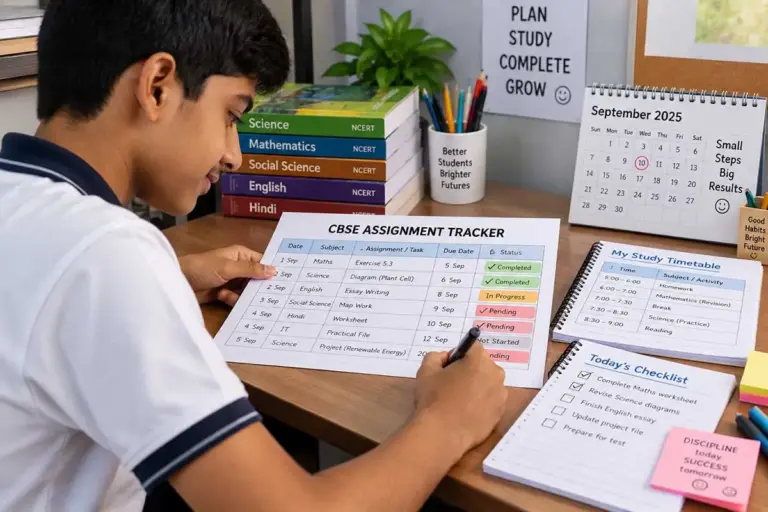
Here’s an example of what one might look like in practice:
| Date Assigned | Subject | Task | Due Date | Priority | Status | Submitted |
| 5 Sept | Mathematics | Exercise 5.3 | 7 Sept | High | In Progress | No |
| 5 Sept | Science | Complete diagram | 8 Sept | Medium | Not Started | No |
| 6 Sept | English | Writing assignment | 10 Sept | Medium | Completed | Yes |
| 6 Sept | Social Science | Map work | 9 Sept | High | In Progress | No |
That’s really the whole idea: students should always know what needs doing, when it’s due, and what’s still left.
This matters more than it sounds, because schoolwork rarely comes from one place. Between class assignments, worksheets, projects, practical files, and online submissions, it’s easy for something to fall through the cracks. For a broader look at organising study time around all of this, the CBSE Study Planner for Students is worth a look too.
Why Bother Tracking Assignments at All?
Most students aren’t struggling because they don’t want to study — they’re struggling because there’s simply too much competing for their attention at once. A student might remember the Maths worksheet perfectly and still completely forget an English project deadline. Or finish a Science project on time and then forget to bring the materials to school.
An assignment tracker fixes this by giving students one reliable place to check instead of relying on memory:
- It catches things before they’re forgotten. Writing a task down the moment it’s assigned beats hoping you’ll remember it later.
- It makes deadlines visible. Something due tomorrow deserves different urgency than something due in two weeks.
- It breaks big projects into bite-sized pieces. Instead of one intimidating line — “Science Project” — students can list: select topic, research, outline, write, add diagrams, check references, prepare presentation, submit. Suddenly it doesn’t feel so huge.
- It helps students prioritise. A simple system works: High (due in 1–2 days or worth significant marks), Medium (due in 3–7 days), Low (plenty of time left).
- It gives parents something useful to look at. Instead of asking “Did you finish your homework?” for the hundredth time, they can glance at the tracker and ask better questions — what’s due first, what’s stuck, whether any materials are needed.
What Should Actually Go On the Tracker?
You don’t need twenty columns — that just makes the whole thing harder to keep up with. A handful of fields does the job:
- Subject, so tasks can be grouped at a glance.
- The actual task, written specifically rather than vaguely. “Science work” tells you nothing; “Complete NCERT questions 1–8 from Chapter 4” tells you exactly what to do.
- Date assigned, which helps spot older work that’s been sitting untouched.
- Due date — arguably the single most important field on the whole sheet.
- Priority (High / Medium / Low, or a 1–3 scale).
- Status — Not Started, Started, In Progress, Waiting for Help, Completed, Submitted.
- Submission method — notebook, printed sheet, project file, classroom hand-in, or an online portal.
- Notes, for the small but easy-to-forget things: bring chart paper, ask the teacher about question 5, print photos, get a parent’s signature, finish the bibliography.
Setting One Up, Step by Step
Building a tracker takes a few minutes, not a project of its own.
- Pick one system and stick to it. Don’t split the same information across a notebook, a phone app, loose paper, and a WhatsApp chat. Younger students often do best with a printed sheet; older ones can manage a notebook, spreadsheet, or digital doc.
- Write assignments down the moment they’re given — not that evening, especially on days when several teachers assign work at once.
- Record the real deadline. If a teacher says “next Monday,” write the actual date. If it hasn’t been announced yet, jot down TBD and fill it in later.
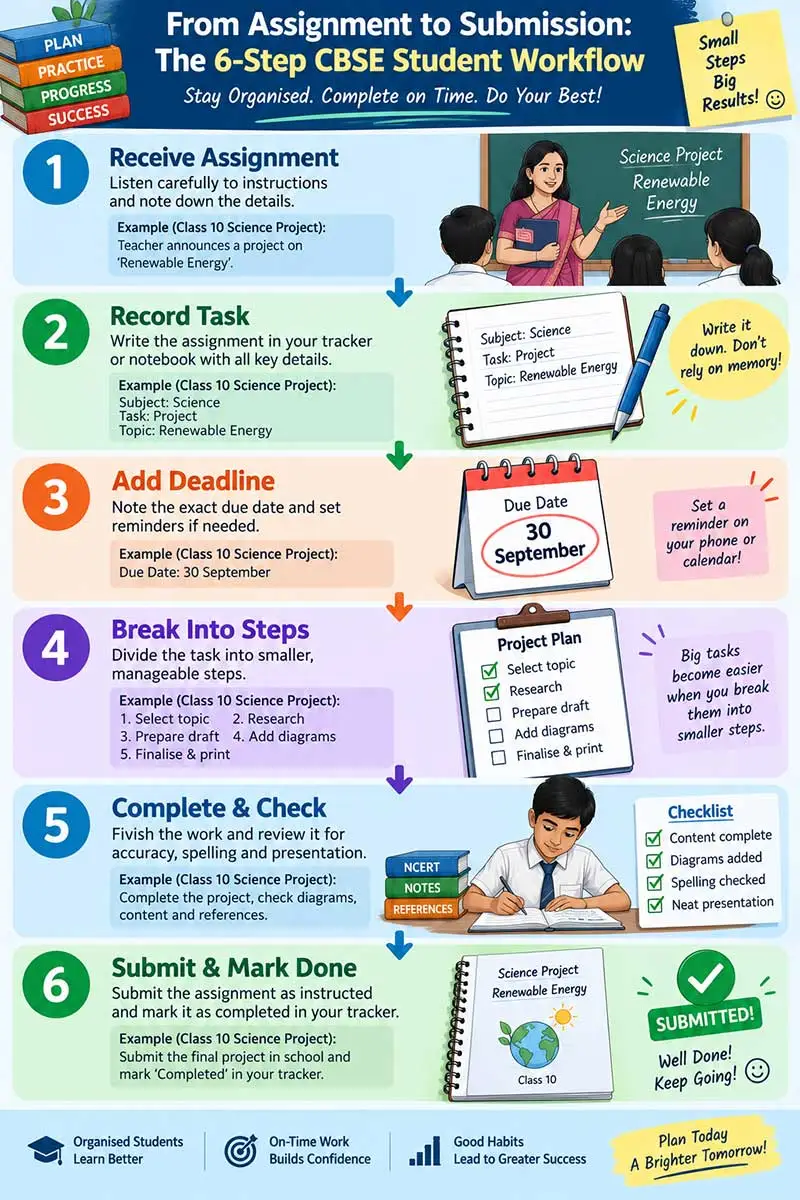
- Break large tasks into stages. A project or practical file becomes far less daunting once it’s split — select topic, collect information, draft, add diagrams, proofread, submit — each with its own due date and status.
- Be honest about progress. “Almost done” isn’t “Completed.” A task counts as done once the work is actually finished and checked.
- Give it two minutes a day. What’s due tomorrow? What’s overdue? What should start today? Is anything stuck waiting on something else?
- Review it properly once a week, clearing finished tasks and carrying anything unfinished into the next week — otherwise it just turns into a long list nobody looks at.
A Printable Template to Start With
Students can copy this straight into a notebook or spreadsheet.
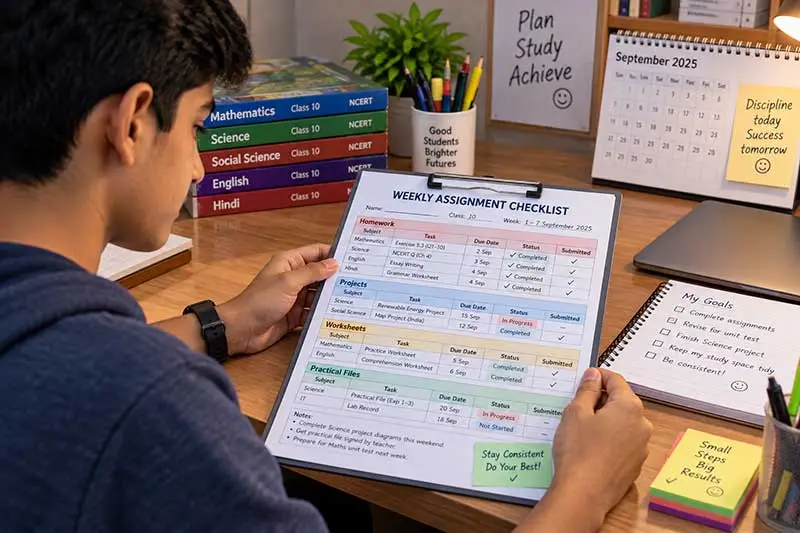
Weekly Assignment Tracker — columns for Subject, Assignment, Assigned, Due, Priority, Status, Submitted, with a row each for Maths, Science, English, Hindi, Social Science, and any skill/optional subject.
Project & Practical Work Tracker — columns for Subject, Project/Practical, Next Action, Deadline, Materials Needed, and Status.
For students who’d rather start from a ready-made printable than build one from scratch, KidsWorldFun’s free grade-wise worksheets are a handy companion — useful for the practice work that often sits alongside the tracked assignments themselves.
Before-Submission Checklist
- Answered every required question
- Followed the teacher’s instructions
- Checked calculations and spellings
- Labelled diagrams where needed
- Included name and class details
- Checked page order
- Attached required worksheets or documents
- Completed the bibliography/references, if required
- Got the required signature
- Knows how and where to submit
- Recorded the submission on the tracker
Tracking Different Kinds of Schoolwork
Not all schoolwork behaves the same way, so it helps to track it a little differently by type. Homework just needs subject, task, and due date — e.g., “Mathematics — Exercise 6.2, Questions 1–10 — Due Tuesday.” Worksheets need four checkpoints: received, completed, checked, submitted. Projects need more detail since they involve several stages — research, writing, design, proofreading, submission. Practical files benefit from a completion column tracking whether the record is written, the diagram’s done, observations are noted, and the teacher has checked it. Reading assignments can note the book or chapter, pages, a completion date, and a short reflection. And online assignments should record the platform used — this alone prevents the common mistake of finishing work and forgetting to actually upload it.
Tracker vs Study Planner vs Timetable — What’s the Difference?
These get confused a lot, but they solve different problems:
| Tool | Main Purpose | Question It Answers |
| Assignment Tracker | Manage schoolwork | What’s pending? |
| Study Planner | Organise learning goals | What should I study this week? |
| Study Timetable | Allocate time | When should I study? |
| Revision Checklist | Monitor exam prep | What’s been revised? |
| Mistake Log | Track learning errors | What should I correct? |
A student can use all five without any real duplication — the tracker says “Complete the Maths worksheet by Wednesday,” the planner says “revise that chapter Tuesday,” the timetable blocks 5:00–5:45 PM for it, the checklist marks it revised, and the mistake log notes any recurring errors along the way. If the timetable side of things feels shaky, the CBSE study timetable guide walks through building one.
How Parents and Teachers Fit In
A tracker should build responsibility, not become another way of policing a student.
Parents can check in once or twice a week rather than daily, asking things like: is anything overdue, which assignment feels hardest, are any materials needed, is the workload realistic? This kind of check-in matters even more in Indian households, where school, tuition, coaching, and family time are all competing for the same few evening hours. A supportive learning environment at home makes all of this easier to sustain.
Teachers, meanwhile, can help simply by setting milestone dates for bigger projects instead of a single far-off deadline — topic selection by the 10th, research by the 15th, a first draft by the 20th, and so on. It gives students several chances to make real progress instead of one big scramble at the end.
Mistakes Worth Avoiding
- Vague tasks. “Do Science” isn’t actionable. Write exactly what needs finishing.
- Tracking homework only. Projects, practicals, presentations, and online submissions all eat time too.
- Skipping the submission step. Finishing isn’t the same as submitting — the tracker should tell those two apart.
- Overcomplicating it. If maintaining the tracker takes longer than reviewing it, it’s too complicated.
- Letting deadlines go stale. Update the sheet the moment a teacher announces a change.
- Ignoring the hard stuff. “Waiting for Help” is useful information — it flags a task that needs attention, not one to quietly carry forward forever.
- Using it as punishment. A missed assignment should prompt a conversation about what went wrong, not blame.
Making It Work During Exam Season
Assignments don’t politely disappear once exams are close — they tend to sit right alongside revision, sample papers, and practical work.
A simple priority filter helps: A for must-complete-today, B for due within three days, C for anything longer-term. Clear the A tasks first, then protect the rest of the evening for revision.
It also helps to physically separate homework time from revision time, something like: homework from 4:30–5:15, a short break, Maths revision from 5:30–6:20, some downtime, then Science practice and a bit of light revision before bed. The exact split will depend on the student’s age, school hours, and how the household runs — and for exam-specific strategies, the CBSE board exam preparation guide has more.
Two small additions make a big difference here. A “Next Action” column turns “English Project — Not Started” into something concrete, like “Select two poems for comparison” — which quietly reduces procrastination. And a “Doubt” or “Help Needed” column gives students a place to record what they don’t understand instead of just postponing the task again and again. This pairs well with active recall, question practice, and other habits covered in the effective study techniques guide.
Keeping It Aligned With NCERT and CBSE Resources
A tracker only works if it’s actually built around the syllabus a student is following. For the 2026–27 academic year, CBSE’s own curriculum page lists the current curriculum for Classes IX–XII — worth checking rather than relying on an old syllabus: CBSE Academic Curriculum 2026–27.
NCERT’s textbook portal covers Classes I–XII and is useful when entering chapter-based homework or revision tasks: NCERT Textbooks PDF Portal.
For Class 10 and 12 students specifically, pairing the tracker with ready-made NCERT-aligned study material from Cogniks can save time — important questions and revision notes are already organised by subject and chapter, which fits neatly into chapter-based tracker entries.
A Simple Weekly Routine
None of this needs to take long. On school days: record new assignments as they’re given, check what’s due once home, pick the highest-priority task before starting homework, update the status once it’s done, and glance at tomorrow’s deadlines before bed.
On Sundays, spend ten or fifteen minutes reviewing what’s completed, what’s overdue, upcoming projects, tests, materials needed, and anything tricky — plus the major deadlines coming up over the next two weeks. It’s a small habit, but it heads off a surprising amount of last-minute scrambling.
Key Takeaways
- A CBSE assignment tracker keeps homework, projects, and worksheets in one place.
- Record assignments the moment they’re announced.
- Always include the exact due date where possible.
- Break large projects into smaller milestones.
- Use simple statuses: Not Started, In Progress, Completed, Submitted.
- Keep the tracker separate from — but connected to — a study planner and timetable.
- Add a “Next Action” or “Help Needed” column for anything difficult.
- Review briefly each day, and more thoroughly once a week.
- During exams, protect dedicated revision time rather than letting assignments eat into it.
- Build entries around the current CBSE curriculum and NCERT textbooks.
Frequently Asked Questions
1. What is a CBSE assignment tracker?
A checklist or table for recording homework, worksheets, projects, practical work, deadlines, progress, and submission status — built to reduce the odds of forgetting something important.
2. Can I just use a notebook?
Yes, completely. Columns for subject, assignment, due date, priority, status, and submission are all it needs. A printed template or spreadsheet just adds a bit more structure if that’s preferred.
3. How is this different from a study planner?
A tracker focuses on schoolwork that needs finishing and submitting; a study planner focuses on learning goals, revision, and practice sessions. Most students benefit from using both.
4. Should projects be tracked separately from homework?
Usually yes — projects have multiple stages (topic, research, draft, design, proofreading, submission), so they’re easier to manage on their own.
5. How often should the tracker be updated?
Whenever a new task comes in, and whenever a status changes. A quick check at the end of each school day keeps it accurate.
6. What if an assignment is already overdue?
Mark it as overdue rather than ignoring it, work out why it slipped, and decide the next step. If it’s a matter of needing more time or clarity, that’s a conversation for the teacher or parent, not something to leave buried.
7. Is this useful for Class 10 and 12 students specifically?
Definitely — especially when board prep overlaps with regular schoolwork. It helps to keep separate sections for immediate assignments and longer-term exam preparation.
8. Digital or printed — which is better?
Neither, really. Printed suits younger students or anyone who likes writing by hand; digital suits students who work online often. The best tracker is simply the one that actually gets updated.
9. Should parents maintain it for younger kids?
Early on, sure — a little help goes a long way. As students get older, ownership should gradually shift to them; the goal is independent planning, not a permanent reliance on reminders.
10. Can this be combined with a CBSE study timetable? Yes, and it works well together — the tracker covers what needs doing, the timetable covers when it gets done.

Student Success Desk focuses on practical learning strategies, study techniques, and academic improvement tips for school students.