If you’ve ever sat through an online class while half-watching a video and half-scrolling your phone, you already know the problem with online learning. It isn’t the technology. It’s how easy it is to be “present” without actually learning anything.
The good news is that fixing this doesn’t require expensive gadgets or a complete overhaul of how a student studies. It comes down to a few things: clear goals, shorter and more active lessons, regular practice, honest feedback, and a bit of structure at home. Videos, quizzes, apps, and AI tools can all help — but only when they support real learning instead of replacing it.
For Indian students, there’s an extra layer to think about too: patchy internet, shared devices, regional languages, and the pressure of CBSE board exams and entrance tests. The National Education Policy 2020 acknowledges this directly, calling for digital learning that closes the access gap rather than widening it, and works alongside classroom and hands-on learning rather than replacing it.
What Actually Makes Online Learning Work
A good online lesson isn’t a video a student watches start to finish. It’s something that makes them think, question, try, get something wrong, and try again.
The elements that tend to show up in effective online learning are fairly consistent:
- A clear goal for the session
- Short, focused chunks rather than long stretches
- Something interactive, not just passive watching
- Regular revision built in, not left for “later”
- Feedback that actually says something useful
- Some room for collaboration
- Sensible, safe use of technology
Why Students Struggle With It
Flexibility is online learning’s biggest selling point — and also its biggest trap. Without a fixed timetable, lessons get postponed. Revision quietly disappears. A five-minute break turns into forty minutes of unrelated videos.
Then there’s passive watching, which feels like learning but often isn’t — you can watch an entire chemistry video and still not be able to explain it afterward. Add in notification pings, hesitation to speak up in a live class, unreliable internet, and the sheer number of apps competing for a student’s attention, and it’s easy to see why concentration slips.
None of this means students need more screen time. It usually means they need better-designed lessons, more purposeful use of the tools they already have, and a bit more support from the adults around them.
10 Practical Ways to Make Online Learning More Effective
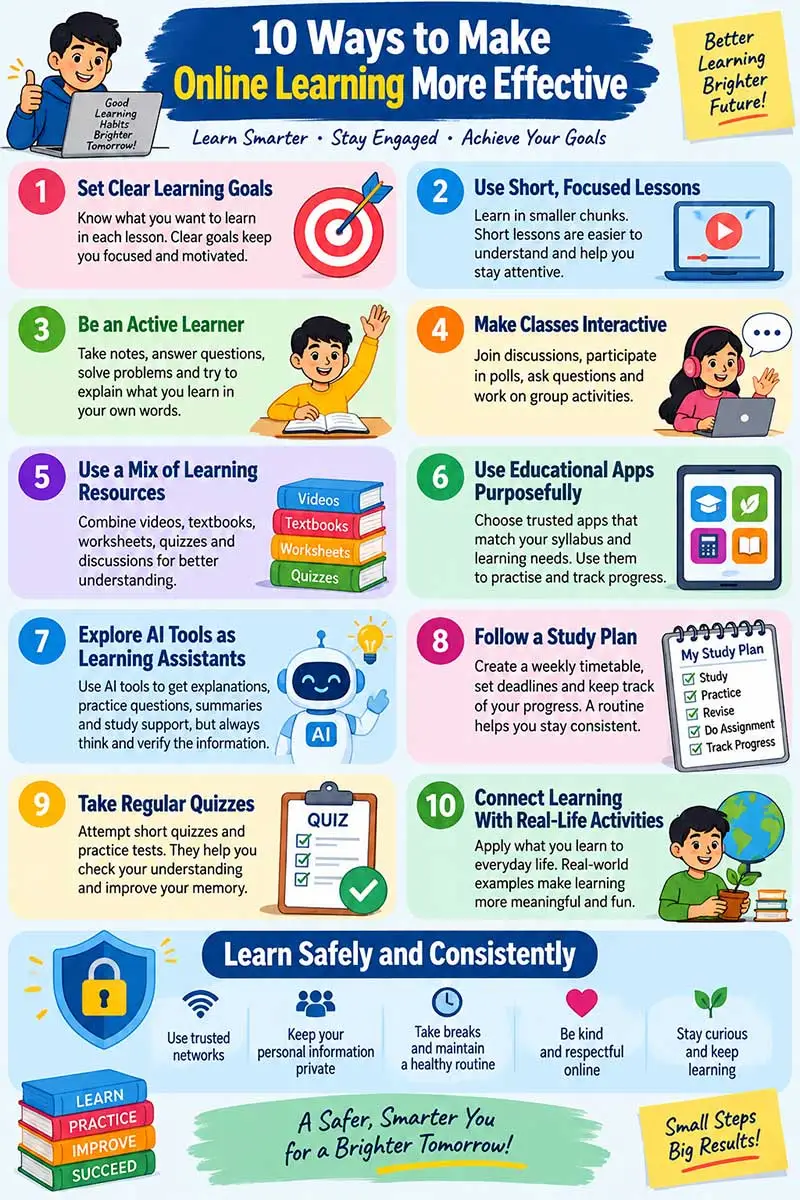
1. Start With a Specific Goal, Not a Vague One
“Study Science” isn’t a goal — it’s a mood. A real one sounds more like: “By the end of this lesson, I’ll be able to explain the water cycle and draw a labelled diagram.” A Grade 6 Maths goal might be as simple as solving five fraction problems with unlike denominators.
A goal like this is specific, doable in the time available, tied to the syllabus, and easy to check off. Teachers can put two or three of these on screen at the start of class; students can jot them down and glance back at the end to see what actually stuck.
2. Break Lessons Into Shorter Chunks
Long lectures wear students down, especially younger ones. A 45-minute class works better broken up — a quick review, a short explanation or video, some interactive questions, independent practice, a bit of discussion, and a summary at the end. The exact split depends on the age group and the subject, but the principle holds everywhere: attention fades in long, unbroken stretches.
This is really the same idea behind the Pomodoro Technique, where short study bursts followed by real breaks tend to beat marathon sessions.
3. Make Students Do Something With What They Learn
After a lesson on photosynthesis, watching isn’t the finish line. A student could explain the process without the textbook, sketch a diagram, answer a few practice questions, or try explaining it to a parent or sibling — that last one is a surprisingly good test of whether something has actually been understood. Polls, quizzes, and digital whiteboards during a live class push the same kind of active engagement.
4. Make the Class Feel Like a Conversation
A one-way broadcast rarely holds attention for long. Polls, quick discussions, breakout groups, shared documents, and simple Q&A sessions all turn a lecture into something closer to a dialogue. During an Environmental Studies class on water conservation, for instance, a teacher could simply ask students to name one way their family uses water at home and build a shared list from the answers. Engagement doesn’t need a big budget — a good question or a household experiment works just as well.
5. Mix Videos, Reading, Practice, and Discussion
No single resource does everything. A video is good for introducing an idea; a textbook fills in the detail; a quiz checks whether it landed; a worksheet builds the skill; a discussion forum lets students ask what they’re still unsure about. A balanced lesson usually touches more than one of these — and for CBSE students, digital resources work best when they support the prescribed curriculum rather than substitute for it.
6. Use Apps and Platforms With a Purpose
Educational apps are useful for practice, explanations, and tracking progress — DIKSHA, for instance, is one of the platforms Indian students can turn to for curriculum-linked content, including material tied to the QR codes in textbooks, and it sits within the Ministry of Education’s broader PM e-VIDYA initiative. Before adopting any app, it’s worth checking whether it actually matches the student’s grade and syllabus, gives accurate explanations, and doesn’t come loaded with distractions.
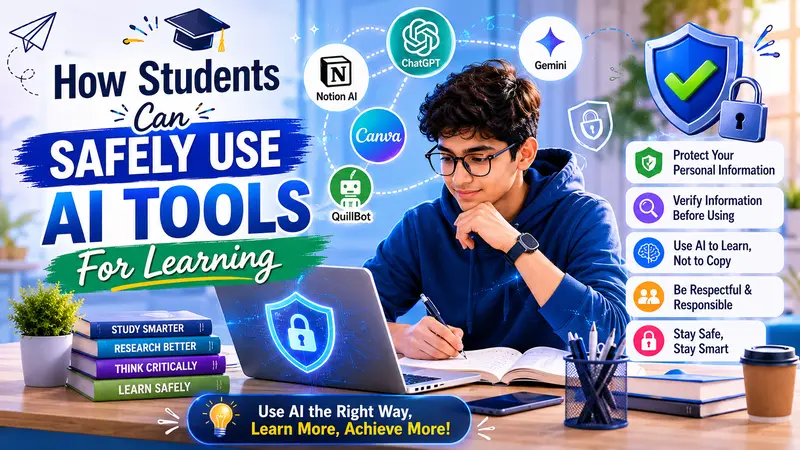
7. Treat AI as a Study Assistant, Not a Shortcut
Used well, AI tools can explain a tricky concept a different way, generate practice questions, build revision flashcards, or give feedback on a draft answer. A student struggling with fractions might ask an AI tool to explain equivalent fractions using a pizza example — then go solve a few problems independently and check the explanation against a textbook or teacher.
The catch is that AI answers can be wrong, incomplete, or just not quite right for the syllabus, so important academic content is still worth double-checking. There are tools built specifically for this kind of guided correction — this piece on how AI tutors help students learn from their mistakes is worth a look if you want to see the idea applied to Class 10 and 12 study habits. The rule worth remembering: use AI to ask better questions and understand things more deeply, not to skip the thinking altogether.
8. Build a Simple, Realistic Study Plan
Self-paced learning only works with a bit of structure around it. A basic weekly plan — watch and take notes one day, practice questions the next, revise, clear doubts, finish a worksheet, take a short quiz, review progress — keeps things moving without becoming rigid. Breaking a vague task like “finish the Science chapter” into smaller steps (read a section, watch the explanation, write key points, answer questions, revise the diagram) makes progress visible and procrastination harder.
9. Test Often, but Keep the Stakes Low
Frequent, low-pressure checks — a five-question quiz, an exit ticket, a one-minute explanation, a quick self-assessment — tell a student what’s actually sinking in and what needs another look, well before it becomes a problem at exam time. Reviewing old, solved question papers works the same way: it’s less about memorising answers and more about spotting the gaps early. The goal is improvement, not a running scoreboard.
10. Connect the Screen to Real Life
Learning sticks better when it steps outside the lesson. Watch water evaporate from two containers in different spots for Science, compare grocery discounts for Maths, record and review a speech for English, build a paper timeline for Social Science, sketch a flowchart for Computer Science, or track a week of household electricity use for Environmental Studies. None of these need special equipment — just a reason to apply what was learned.
What Teachers Can Do Differently
Good online teaching is more than uploading slides or recording a lecture. It helps to plan each class around a clear outcome — objectives, prior knowledge, resources, a practice activity, and a way to check understanding, all sketched out beforehand.
Feedback matters more than it’s usually given credit for. “Good” or “Try again” doesn’t tell a student much. Something like “Your explanation gets the three stages right — now add a labelled diagram showing how water moves between them” actually helps. And because students differ in pace, language, confidence, and access to devices, having recorded lessons, downloadable notes, captions, and a few bilingual resources on hand goes a long way. Group work and peer review help too, as long as everyone has a real role to play, not just a seat in the group.
How Parents Can Help Without Becoming the Teacher
Parents don’t need to teach every subject — they mostly need to set the conditions for learning to happen. A quiet corner with a notebook and a charged device, even if it’s not a whole separate room, makes a real difference. So does drawing a clear line between educational screen time and everything else, with actual breaks, movement, and sleep built in.
Asking rather than answering tends to work better too — “What did you learn today?” or “Which part was tricky?” gets a student thinking instead of just reporting. Checking in on progress without turning it into a comparison with the neighbour’s child helps keep motivation intact rather than eroding it — this is where getting the everyday learning environment at home right makes more of a difference than any single app or tool. And a quick reminder about not sharing passwords or personal details online is worth repeating more than once.
Keeping Online Learning Safe and Inclusive
A few basic habits go a long way: strong passwords, multi-factor authentication where it’s available, caution around suspicious links, apps from trusted sources only, and knowing when to flag something to a trusted adult.
Access is the other half of “inclusive.” Not every family has a personal laptop or fast internet, so downloadable materials, low-data resources, shared-device schedules, and printed worksheets matter more than they might seem to. The Ministry of Education’s own digital initiatives recognise this gap and lean on multiple modes of access — television, radio, and offline content — specifically for learners without reliable connectivity.
Online Learning vs the Traditional Classroom
Neither format wins outright. Online learning offers flexibility, self-paced revision, and a wide spread of digital resources, but it depends heavily on device access and a stable connection. A traditional classroom offers direct interaction, hands-on materials, and structure, but runs on a fixed timetable and requires travel. For most students, a blend of both — leaning on whichever strengths fit the subject and the moment — works better than committing fully to either.
A Quick Checklist Before, During, and After a Lesson
Before: know what you’re meant to learn, have your device charged, keep your textbook and notebook within reach, and check the lesson time.
During: pay attention, take notes worth keeping, answer the questions asked, raise doubts instead of sitting on them, and keep notifications off.
After: try explaining the main idea out loud, finish the practice activity, note what was difficult, and know what to study next.
Key Takeaways
- Watching isn’t learning — doing something with the content is what makes it stick.
- Clear goals give students something concrete to aim for.
- Shorter lessons, regular practice, and real feedback build better habits than long sessions ever will.
- Pick apps based on curriculum fit and accuracy, not popularity.
- AI is useful for explaining and revising, not for replacing independent thinking.
- Parents help most through routine, encouragement, and safety — not by re-teaching every subject.
- Teachers get more from interactive lessons than from recorded monologues.
- Online resources work best alongside textbooks and real-world activity, not instead of them.
- Breaks, sleep, and a sense of balance matter as much as the study plan itself.
- Consistency beats intensity, almost every time.
Frequently Asked Questions
How can I make online learning more effective?
Set specific goals, stick to a rough timetable, take notes during live classes, practise regularly, and go back over your mistakes. Use apps and AI tools to support the process, not to do the thinking for you.
How can online classes become more engaging?
Polls, quizzes, discussions, group work, and real-life examples all help. Students learn more by participating than by watching quietly.
Is online learning better than classroom learning?
Not inherently — each has strengths the other doesn’t. Online learning offers flexibility and digital resources; classrooms offer direct interaction and hands-on experience. A mix of both usually works best.
Which online tools are useful for CBSE students?
NCERT textbooks, DIKSHA, curriculum-aligned quizzes, and digital worksheets are a good starting point. The best tool is simply the one that fits the student’s grade, subject, and actual learning gap.
Can AI help with CBSE exam preparation?
Yes — for explaining concepts, generating practice questions, and organising revision. Just verify anything important against a textbook, teacher, or official resource before relying on it.
How can parents support online learning without hovering?
Set up a consistent study space, agree on screen-time boundaries, ask questions instead of supplying answers, and check in on progress without turning it into a comparison exercise.
What should students do with a poor internet connection?
Lean on downloadable resources, recorded lessons, and printed worksheets, and talk to teachers about alternative ways to submit work when connectivity is genuinely unreliable.
How much screen time is “right” for online learning?
There’s no single number that fits every student. What matters more is breaking up screen time with movement, protecting sleep, and making sure some learning happens away from a screen too.

Learning Support Team shares guidance on safe online learning, educational technology, and effective digital study practices.