
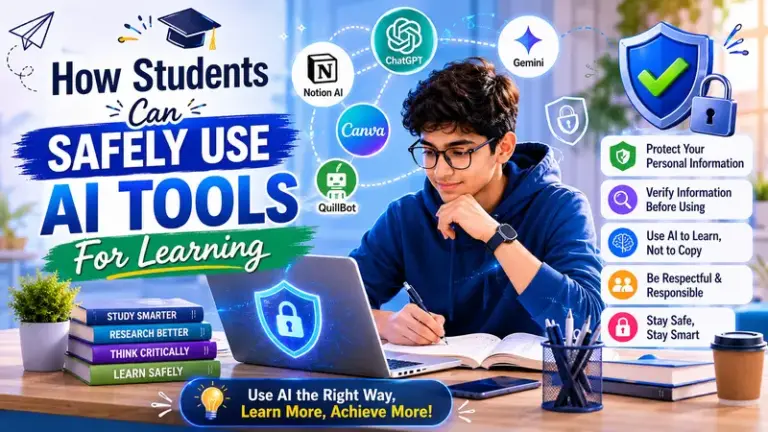
A student in Class 11 once told her teacher something that stuck: “I don’t use the app to cheat. I use it because I don’t want to sit with a doubt for three days waiting for the next class.”
That’s probably the most honest thing anyone has said about why students use AI tools. Not to avoid studying. Not to copy answers. But because learning has gaps — moments where you’re stuck, where the textbook isn’t helping, where you need something explained differently — and these tools fill those gaps at 9 pm when no one else can.
The question isn’t really whether students should use AI tools for students. Most already do. The real question is how to use them in a way that actually builds knowledge rather than quietly replacing the effort of building it.
This article tries to answer that honestly — for students, for parents, and for teachers who want to understand what’s actually going on.
What’s the Real Risk Here?
Let’s not exaggerate. Using Photomath to check a Maths problem isn’t going to harm anyone. Watching a Khan Academy video to understand cell division isn’t cheating. Looking up a grammar rule in Grammarly while writing an English essay isn’t a shortcut that will come back to bite you.
The risk is more subtle than that.
It creeps in when a student photographs a question before even reading it properly. When “checking the answer” becomes the first step instead of the last. When a student can explain what the app showed but not why the method works. When mock tests get done with a phone nearby because “I just want to see if I’m on the right track.”
None of those moments feel dramatic. Each one seems harmless in isolation. But they slowly build a habit of reaching for help before engaging with difficulty — and that habit is genuinely costly in an exam hall where there’s no app, no internet, and no one to ask.
That’s the real thing to protect against.
How to Actually Use These Tools Well
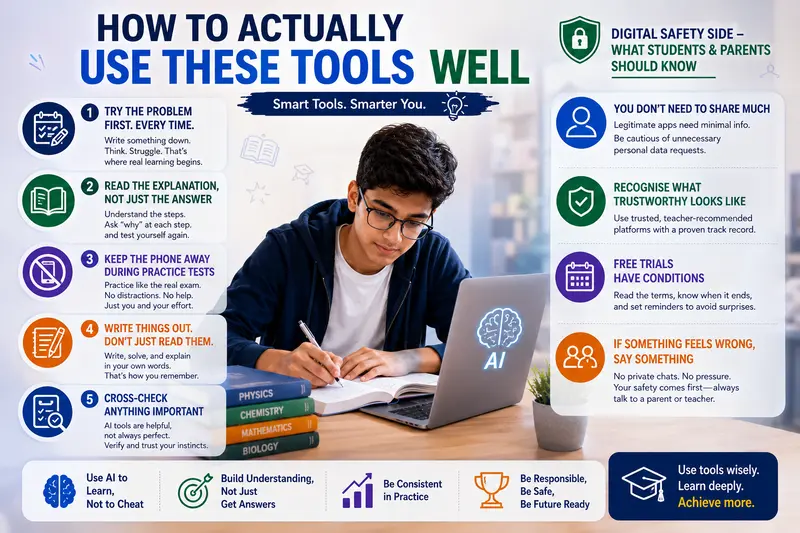
Try the Problem First. Every Time
This sounds simple. It isn’t, because the temptation to open the app is strongest exactly when the problem is hardest — which is precisely when you most need to sit with it on your own.
Make a rule for yourself: before opening any tool, write something down. Even if you’re not sure. Even if it’s just identifying the formula you think might apply, or writing out what the question is asking. Get your brain working on the problem before you hand it over to a machine.
What you’re doing in those few minutes isn’t wasted effort if you get it wrong. Those are the minutes that actually build understanding. The struggle of not immediately knowing is part of how learning works.
Once you’ve genuinely tried — and either gotten it wrong or hit a wall you can’t get past — then open the tool. Now it’s showing you where your thinking diverged from the correct approach, which is useful information. Before you’ve tried, it’s just doing your thinking for you.
Read the Explanation, Not Just the Answer
Here’s a habit that separates students who benefit from these tools from those who don’t: they read the method, not just the final line.
When Wolfram Alpha solves an integral, there are six or seven steps before the answer. When Symbolab explains a matrix determinant, it names the rule it’s applying before using it. When Socratic explains a Biology concept, it breaks the idea down into smaller connected pieces.
Students who scroll to the answer and close the app get almost nothing from the interaction. Students who work through the explanation — asking themselves “why did it do that in step 3?” — get something genuinely valuable.
After reading an explanation, test yourself. Close the app and redo the problem from scratch without looking. If you can, you’ve learned something. If you can’t, you need to spend a bit more time with it before moving on.
Keep the Phone Away During Practice Tests
This one is non-negotiable.
Timed practice — mock tests, past papers done under exam conditions — exists for one reason: to find out what you actually know when there’s no help available. The moment you check an app mid-test, you’ve destroyed the point of the exercise.
Board exams give you a question paper and a pen. Nothing else. The only way to prepare for that environment is to regularly practise in that environment. Do your timed tests with the phone in another room. Check the answers afterwards. Use the tool then to understand the ones you got wrong.
Exam conditions feel uncomfortable when you’re not used to them. That discomfort during practice is what prevents panic during the real thing.
Write Things Out. Don’t Just Read Them.
There’s a version of “studying” where you read through a solution on a screen, nod along, think “yes, I get it,” and move on. It feels like learning. It mostly isn’t.
CBSE board papers require handwritten answers — structured steps in Maths, labelled diagrams in Science, complete paragraphs in English and Social Studies. The ability to produce that under time pressure only develops through writing practice, not reading practice.
After using any digital tool to understand something, close it and write the solution out yourself. Redo the problem in your notebook. Draft the answer from memory. This step — the transfer from screen to paper — is where actual learning happens.
Cross-Check Anything Important
AI tools are accurate most of the time. Not all of the time.
They can misread handwriting in a photograph. They can misinterpret a question that’s phrased ambiguously. They occasionally produce confident-looking answers that are subtly wrong. This is especially possible for complex word problems, multi-step derivations, or questions that require reading comprehension before mathematical solving.
If a tool gives you an answer that doesn’t look right to you, trust that instinct. Check against your NCERT. Ask a teacher. Don’t assume the tool is correct simply because it gave you something immediately.
Developing the ability to recognise when an answer seems plausible versus when something feels off — that’s a real skill. These tools, counterintuitively, can help you build it if you stay engaged rather than passively accepting output.
The Digital Safety Side — What Students And Parents Should Know
This part of the conversation gets less attention than it deserves.
You Don’t Need to Share Much
Legitimate educational apps don’t need your home address, your Aadhaar details, or information about your family to teach you Maths. Most need an email address and maybe your grade level. That’s it.
If an app’s registration form asks for information that feels unnecessary — or if it asks for payment details before showing you what the service actually is — close it. A useful, trustworthy platform doesn’t need to extract personal information to function.
For students in Class 8, 9, or 10 especially, parents should take a look at what an app is requesting before the child creates an account.
Recognise What Trustworthy Looks Like
Not every educational app that shows up in a search result is equally reliable. The ones worth using are generally those recommended by teachers, cited by schools, or established enough to have a real track record.
Platforms like Khan Academy, DIKSHA, the CBSE official app, Wolfram Alpha, and Socratic have been used by millions of students. They’re not perfect, but they’re transparent about what they offer and don’t make outlandish promises.
Be more cautious about apps that promise exam success in impossibly short timeframes, those that push aggressive upsells from the moment you download them, or those that have no clear information about who runs them.
Free Trials Have Conditions
Many platforms offer free trials that roll into paid subscriptions if not cancelled. This is standard business practice and not necessarily dishonest — but students and parents should read what they’re agreeing to.
If a free trial requires payment details upfront, make a note of when it ends. Set a reminder. Know what you’re signing up for. Most good educational tools have genuinely useful free versions — you rarely need to pay for a subscription to benefit from them at the Class 10–12 level.
If Something Feels Wrong, Say It Out Loud
This applies more to younger students but is worth stating clearly. Legitimate educational platforms are structured learning environments — they don’t involve one-on-one private conversations with strangers, unsolicited personal messages, or requests for information outside the learning context.
If anything about an online interaction with an educational platform feels uncomfortable or strange, talk to a parent or teacher. That instinct is usually worth listening to.
A Direct Word for Parents
Seeing your child on their phone doesn’t tell you whether they’re studying or not. The app open on screen could be Photomath helping them understand a calculus problem, or it could be something else entirely. You genuinely can’t tell from a distance.
What you can do is have a conversation about it. Ask your child to show you what they’re using and explain how. Ask them to walk you through a topic they studied using a tool — if they can explain it in their own words, the tool is working as it should. If they can only say “the app showed this answer,” that’s worth exploring together.
Keeping devices out of the room during timed practice sessions is a reasonable, low-conflict boundary to set. Beyond that, the goal is understanding how the tools are being used, not simply banning them — because banning them doesn’t stop usage, it just removes the conversation.
What Doesn’t Work, Honestly
A few habits are worth naming directly because they’re common and they genuinely hurt exam performance:
Opening the app before thinking. The reflex to immediately search for help rather than sitting with difficulty is the core problem. Every time you resist that reflex, you’re building something.
Using three different apps for the same subject. Pick one or two, get familiar with them, and use them consistently. Switching between tools constantly creates noise.
Equating “I watched the solution” with “I know how to do this.” These are very different things. Watching is passive. Doing is active. Only doing prepares you for an exam.
Skipping NCERT and official CBSE resources. Board papers are written by people who know NCERT very well. There are questions every year that come almost directly from NCERT examples or exercises. No third-party app replaces that.
Final Takeaway
AI tools for students are part of how learning works now, and that’s not going to change. The students who use them well — who try first, who understand rather than copy, who practise writing independently, and who treat these tools as one part of a broader preparation — genuinely benefit from having them.
The ones who use them as a way to skip the hard parts of studying don’t benefit, and often discover that too late, in the exam hall. The tools are neutral. The habit you build around them is what matters.
Frequently Asked Questions (FAQs)
Q1. Is using AI tools for studying considered cheating?
Using a tool to understand a concept, verify your working after attempting a problem, or get a topic explained differently is not cheating — it’s learning. What crosses into academic dishonesty is using tools to complete assignments or tests that are meant to assess your own knowledge, or submitting work as your own that you didn’t actually produce. For personal study and exam preparation, these tools are a legitimate resource.
Q2. Which AI learning tools are safe for school students in India?
Platforms with a strong track record and clear educational purpose are the safest starting points. Khan Academy, DIKSHA, the CBSE official app, Wolfram Alpha, Photomath, and Socratic are widely used, well-established, and appropriate for school students. For any new platform, check what personal information it requires at sign-up and whether it’s recommended by a teacher or school.
Q3. How should parents manage their child’s use of AI study tools?
Rather than banning or unrestricted allowing, the most effective approach is curiosity — ask your child what they’re using and how. If they can explain a topic in their own words after using a tool, the tool is working well. Keep devices out of the room during timed practice sessions. Understand that legitimate use exists and is genuinely helpful, while also staying aware of the habits that can undermine real learning.
Q4. Can students trust the answers given by AI tools?
Most of the time, yes — for standard curriculum-level problems. But not always, especially with handwritten inputs, complex multi-step questions, or ambiguously worded problems. Always cross-check important results against your NCERT or with your teacher. Developing the habit of asking “does this answer make sense?” rather than accepting output passively is both a safety measure and a genuine academic skill.
Q5. Are free versions of AI study tools enough for CBSE board preparation?
For most Class 9–12 students, yes. Khan Academy and DIKSHA are completely free with no paywalls. Wolfram Alpha’s free version handles the vast majority of Class 11–12 Maths and Science topics. Photomath and Socratic are free for the features most students actually use. You rarely need a paid subscription to benefit meaningfully from these tools at the secondary level.

Learning Support Team shares guidance on safe online learning, educational technology, and effective digital study practices.