Last week I watched a student flip between four browser tabs, a half-charged phone, and a notebook that hadn’t been opened in days — and somehow she still felt like she was “studying.” That scene sums up where we are in 2026. Learning doesn’t live inside a single textbook anymore, and it hasn’t for a while. It lives across apps, dashboards, flashcard decks, and the occasional YouTube rabbit hole that starts as revision and ends somewhere else entirely.
If you’re a CBSE student staring down board exams, a parent trying to figure out which app is actually worth the storage space, or a teacher looking for something more engaging than another worksheet, you already know the real problem isn’t a shortage of tools. It’s the opposite — there are hundreds of them, and most look equally shiny on the app store.
So this guide is my attempt to cut through that noise. I’ll walk you through the study apps that genuinely earn their place on a student’s phone in 2026, what each one is actually good for, and how to combine them with study habits that hold up under exam pressure — not just algorithm-driven hype.
Why Study Apps Have Become Essential
Digital learning stopped being “watch a video and hope it sticks” a long time ago. The apps worth using now build personalized learning paths with the help of AI, adapt quizzes to what a student actually struggles with, run interactive simulations, and hand back feedback instantly instead of a week later with a red pen.
What does that actually get you? Learning that isn’t tied to a desk or a fixed hour, lessons that adjust to where a student is rather than where the syllabus assumes they are, quizzes and interactive content that make ideas stick, doubts answered on the spot instead of piling up, sharper revision through flashcards and mock tests, real data on progress instead of a vague sense of “I think I know this,” and — maybe most underrated — better time management, because a dashboard doesn’t let you pretend you studied more than you did.
For CBSE students specifically, this matters even more, since the right apps track closely with the syllabus while still giving you room to practice beyond the textbook.
If you want to pair these tools with methods that are backed by actual research, our guide on Scientifically Proven Study Techniques is worth a look.
What Makes a Great Study App?
Not every app that shows up in a “Top 10 Study Apps” list deserves to be there. Before you let your child — or yourself — download one more thing, it helps to know what actually separates a genuinely useful app from one that just looks good in a screenshot.
Curriculum Alignment
This is the first filter, and honestly the one people skip most often. An app can be beautifully designed and still be useless if it has nothing to do with what’s actually being examined. The strongest apps track the CBSE syllabus closely and keep their content updated as exam patterns shift. Before you commit to one, check whether it offers NCERT-based lessons, chapter-wise practice, board exam preparation, previous years’ question papers, and sample papers. If it’s missing most of these, it’s probably a nice-to-have, not a must-have.
Interactive Learning
Here’s something most of us learned the hard way, usually while re-reading the same paragraph for the fourth time: reading alone rarely gets difficult concepts to stick. Interactive features — animated explanations, quizzes, live classes, gamified challenges, visual simulations — do a lot of the heavy lifting that plain text can’t. That’s especially true for subjects like Mathematics and Science, where seeing a concept in motion often does what a paragraph of text simply can’t.
Personalized Learning
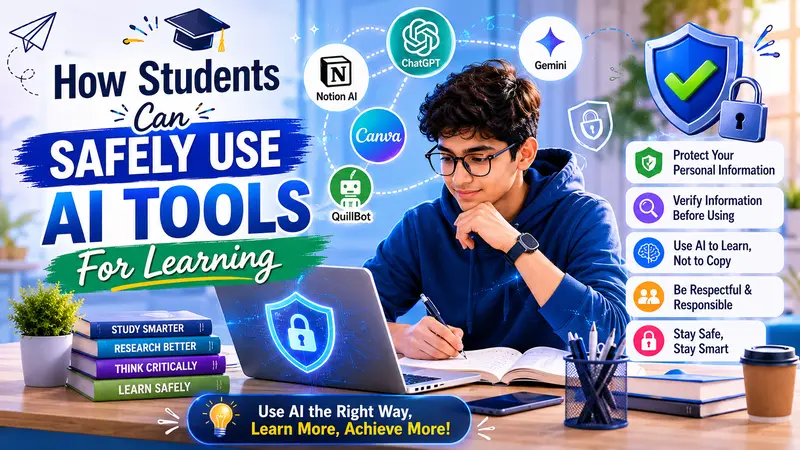
AI gets thrown around a lot in marketing copy, but in study apps it’s earned its reputation. Done well, it can spot which topics a student is actually weak in, recommend practice questions that target those gaps, adjust question difficulty on the fly, suggest a sensible revision schedule, and track progress over time instead of just at the end of a chapter. It’s worth teaching students to use these tools responsibly, too — our piece on How Students Can Safely Use AI Tools for Learning goes into that in more depth.
Progress Tracking
A good study app doesn’t just teach — it shows its work. Look for dashboards that report time spent studying, quiz scores, weak chapters, revision reminders, and learning streaks. None of this replaces effort, but it does something effort alone can’t: it gives students (and parents) an honest, ongoing picture of where things stand, which tends to be far more motivating than a single test score at the end of term.
Best Study Apps for Students in 2026
With that groundwork in place, here’s my actual shortlist — the apps that, in my experience, are worth a student’s time and a parent’s peace of mind in 2026. No single one does everything, so most students end up using two or three together rather than betting on just one.
| App | Best For | Suitable Classes | Offline Support | AI Features |
| Khan Academy | Concept Learning | Classes 6–12 | Yes | Limited |
| Google Classroom | Assignment Management | All Classes | Partial | No |
| Microsoft OneNote | Digital Notes | All Classes | Yes | AI-assisted organization |
| Quizlet | Revision & Flashcards | All Classes | Yes | AI-generated practice |
| Notion | Study Planning | Secondary & Senior Secondary | Partial | AI writing assistance |
| Photomath | Mathematics Practice | Classes 6–12 | Partial | AI explanations |
1. Khan Academy
Khan Academy has stuck around for a reason. It’s still one of the most trusted free educational platforms out there, and its library of lessons, practice exercises, and video walkthroughs makes it a solid companion for CBSE students — Mathematics and Science especially, where a clear step-by-step explanation can save hours of confusion.
Key Features
- Free access to thousands of lessons
- Step-by-step video explanations
- Practice quizzes
- Personalized recommendations
- Self-paced learning
Best For
- Strengthening conceptual understanding
- Revising difficult topics
- Independent learning
2. Google Classroom
Chances are your child’s school already uses this one, since it’s become close to a default across Indian schools. It lets teachers distribute assignments, share materials, run online classes, and give feedback — all without a dozen separate email threads.
Key Features
- Assignment submission
- Classroom announcements
- Digital collaboration
- Integration with Google Docs, Drive, and Meet
- Teacher feedback
Best For
- School-based learning
- Homework management
- Teacher-student communication
3. Microsoft OneNote
Here’s a pattern I see constantly: a student isn’t struggling because they don’t understand the material — they’re struggling because their notes are scattered across three notebooks, a stack of loose paper, and a photo folder they never look at again. OneNote fixes that by giving everything one home.
Key Features
- Create subject-wise notebooks
- Insert handwritten notes
- Record classroom lectures
- Add images and PDFs
- Sync across devices
For anyone juggling multiple subjects, it works as a genuinely powerful digital notebook that cuts down on clutter and keeps things organized without much effort.
4. Quizlet
Revision gets a lot less painful with Quizlet’s digital flashcards and self-testing tools. Students can build their own sets from scratch or borrow from the millions already out there.
Key Features
- Flashcards
- Practice tests
- Matching games
- Learn mode
- AI-assisted quizzes
It’s particularly strong for subjects that rely on memorization — Biology, Social Science, Languages, General Knowledge — where repetition and recall matter more than working through a problem.
5. Notion
Notion has quietly become a favorite among senior students, mostly because it folds note-taking, task management, calendars, and study planning into one workspace instead of five separate apps. Students use it to plan weekly study goals, track assignment deadlines, organize revision schedules, keep subject notes in order, and build their own digital study planners.
Pairing something like Notion with a structured timetable tends to build consistency fast. If you want a starting point, our Perfect Study Timetable for CBSE Students walks through one.
Choosing the Right Combination of Apps
No single app is going to cover everything, and that’s fine — it’s not supposed to. A balanced combination almost always beats one “perfect” app. Here’s a quick way to match need to tool:
| Learning Need | Recommended App |
| Concept Learning | Khan Academy |
| Classroom Assignments | Google Classroom |
| Digital Note-Taking | Microsoft OneNote |
| Revision | Quizlet |
| Study Planning | Notion |
| Mathematics Practice | Photomath |
Rather than collecting a dozen apps and using none of them well, pick a handful that actually match how your child learns and stick with those.
6. Duolingo
Duolingo is best known for languages, but it quietly doubles as a strong tool for English vocabulary, grammar, reading, and pronunciation. Its game-like format gets students to practice a little every day without it feeling like homework.
Key Features
- Bite-sized interactive lessons
- Daily learning streaks
- Vocabulary and grammar practice
- Speaking and listening exercises
- Personalized learning paths
Best For
- Improving English communication skills
- Building vocabulary
- Developing confidence in language learning
7. Forest
If there’s one thing every student (and honestly, most adults) struggles with, it’s the phone. Forest tackles that head-on: start a study session, and you plant a virtual tree. Wander off to Instagram, and the tree stops growing. It’s a small trick, but it works surprisingly well.
Key Features
- Pomodoro timer
- Focus tracking
- Daily productivity reports
- Motivation through gamification
Best For
- Improving concentration
- Reducing screen distractions
- Building productive study habits
For more on this, our piece on Healthy Habits That Improve Concentration While Studying is a good next read.
8. Wolfram Alpha
For higher secondary students tackling Mathematics, Physics, Chemistry, or Computer Science, Wolfram Alpha functions less like an app and more like a computational brain you can consult on demand. It doesn’t just spit out an answer — it shows step-by-step solutions, graphs, and calculations, which means students actually see the reasoning instead of just copying a result.
Best For
- Complex mathematical calculations
- Science problem-solving
- Engineering entrance preparation
- Concept clarification
9. Adobe Scan
This one isn’t a traditional “learning” app, but it earns its spot anyway. Adobe Scan lets students scan handwritten notes, turn documents into PDFs, digitize assignments, share study materials, and store everything securely in the cloud — genuinely useful during project deadlines and group study sessions when someone’s notes always seem to be missing a page.
How to Choose the Right Study App
Every student learns a little differently, so before downloading anything new, it’s worth pausing on a few honest questions:
Ask Yourself
- Does it match my syllabus?
- Is the content updated regularly?
- Can I use it offline?
- Does it include practice tests?
- Is it free or affordable?
- Does it protect user privacy?
- Does it provide meaningful progress reports?
Parents, it’s also worth checking whether the content is age-appropriate and whether the app is light on ads and unnecessary distractions — some “free” apps make up for it in exactly the wrong way.
Tips to Get the Most Out of Study Apps
Installing an app won’t move the needle on its own — I’ve seen plenty of students with a phone full of “study apps” and grades that haven’t budged. These tools work when they’re built into an actual routine.
Create a Daily Learning Schedule
Set aside real time slots for:
- Learning new concepts
- Practicing questions
- Revising previous lessons
- Taking mock tests
- Reviewing mistakes
A structured schedule is what actually prevents the 11 p.m. cramming session. For a starting template, see our Daily Study Routine for Students.
Combine Digital Learning with Written Practice
This one’s backed by research, not just tradition: writing answers by hand genuinely improves memory retention and exam performance. Use apps to understand the concept, then pick up a pen and solve problems in a notebook — that combination is what actually reinforces learning.
Revise Regularly
Long-term retention doesn’t happen by accident. Use the flashcards, quizzes, and mock tests inside your study apps to revisit topics at regular intervals rather than once, right before the exam. Our guide on 10 Smart Revision Techniques for CBSE Board Exams has more specific ideas.
Track Your Progress
Look at the week, not just the day. Keep an eye on:
- Chapters completed
- Quiz scores
- Weak topics
- Time spent studying
- Monthly goals
Regular self-assessment is what actually surfaces the topics that need more attention — before they show up as a bad surprise on an exam.
Common Mistakes Students Should Avoid
A lot of students don’t get much out of study apps simply because of how they’re using them. The usual culprits:
- Downloading too many apps
- Switching between multiple platforms without consistency
- Watching videos without taking notes
- Ignoring revision
- Spending more time customizing apps than studying
- Using phones for entertainment during study sessions
If there’s one rule worth remembering, it’s this: keep the digital study environment simple and distraction-free. More apps rarely means more learning.

Comparison Table: Choosing the Right App
| Requirement | Recommended App Type | Best For |
| Learning new concepts | Video learning platform | Science, Mathematics |
| Revision | Flashcard app | Languages, Biology, History |
| Time management | Planner app | Daily study schedules |
| Homework | Classroom management app | School assignments |
| Note-taking | Digital notebook | All subjects |
| Focus | Productivity app | Reducing distractions |
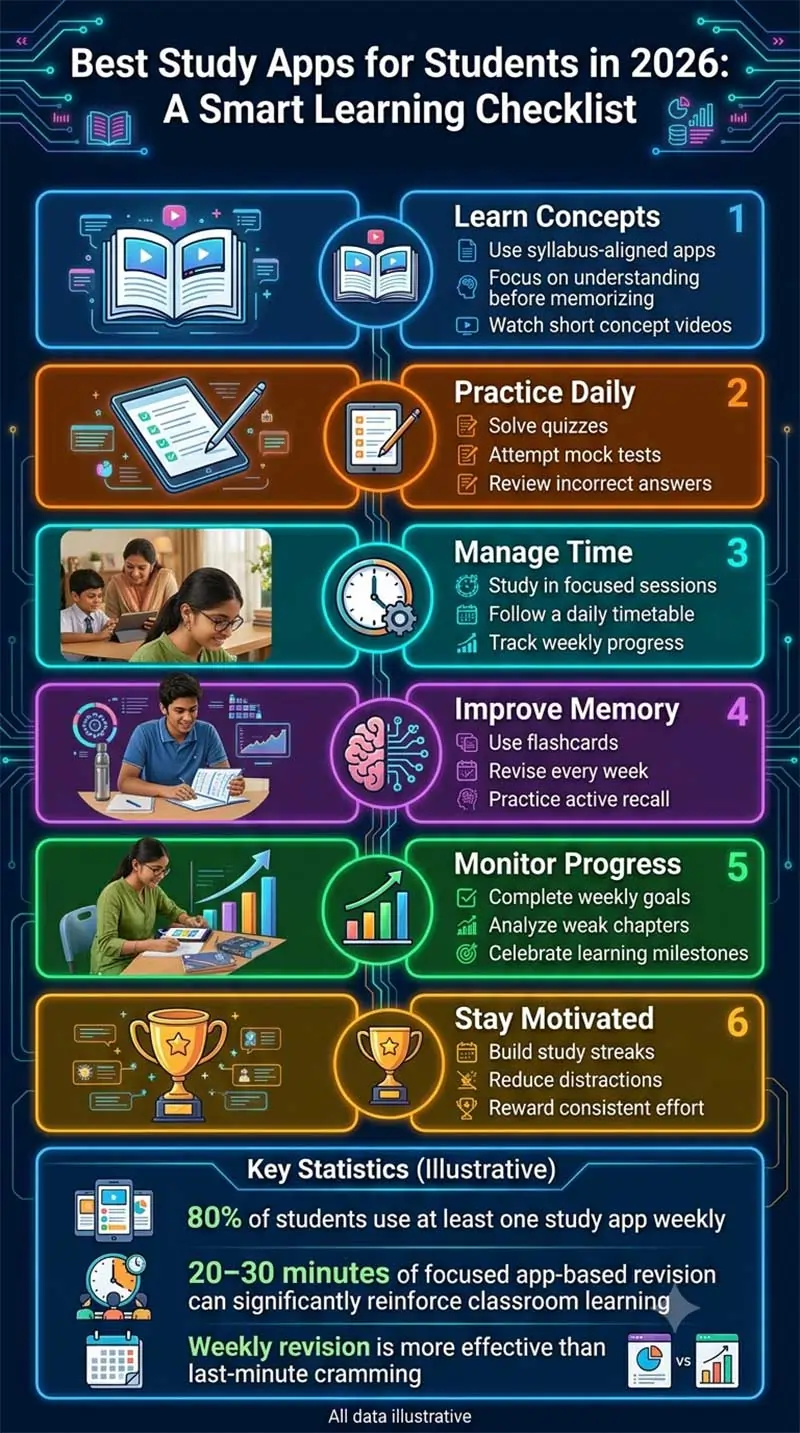
Student Use of Study Apps (Illustrative)
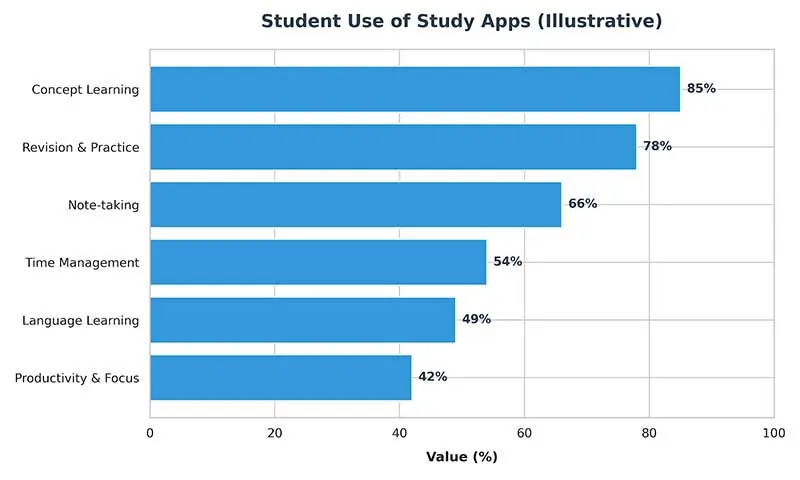
The values are illustrative and intended to show relative popularity of different app categories among students.
Printable PDF Resource 1: Weekly Digital Study Planner
Purpose
Help students organize app-based learning alongside schoolwork.
Sections Included
- Weekly study goals
- Subjects to cover
- App to use
- Practice completed
- Revision completed
- Homework tracker
- Reflection notes
- Parent/teacher signature
⬇️ Download Weekly Digital Study Planner
Printable PDF Resource 2: Study App Evaluation Checklist
Purpose
Help students and parents choose the most suitable educational apps.
Sections Included
- App name
- Subject covered
- CBSE syllabus support
- Offline availability
- Cost (Free/Paid)
- Ease of use
- Progress tracking
- Overall rating
- Recommendation
⬇️ Download Study App Evaluation Checklist
Key Takeaways
- Choose study apps that align with the CBSE syllabus and your learning goals rather than downloading every popular app.
- Use different apps for different purposes, such as concept learning, revision, note-taking, and time management.
- Combine digital learning with handwritten notes and regular practice for better retention.
- Set a daily or weekly study schedule to use educational apps consistently.
- Track your progress and revisit weak topics using quizzes and performance reports.
- Avoid distractions by limiting entertainment during study sessions and using focus apps when needed.
- Parents and teachers should guide students in selecting safe, age-appropriate, and reliable educational apps.
- Technology is most effective when it complements — not replaces — good study habits and classroom learning.
Frequently Asked Questions (FAQs)
1. Which is the best free study app for CBSE students in 2026?
Honestly, there isn’t one single answer. Khan Academy is excellent for building conceptual understanding, Google Classroom keeps school assignments organized, Quizlet is great for revision, and Microsoft OneNote is ideal for keeping notes in order. Most students get the best results from using a combination rather than betting on one app alone.
2. Are study apps enough to score high marks in CBSE board exams?
No, and it’s worth being honest about that. Study apps are genuinely valuable, but they work best alongside NCERT textbooks, classroom teaching, regular written practice, sample papers, and consistent revision. Marks come from disciplined habits, not any single app.
3. Can parents help children use study apps effectively?
Absolutely. Parents can create a distraction-free study environment, encourage a balanced schedule, and keep an eye on screen time. Rather than checking scores constantly, it helps more to focus on building consistent habits. For more, see How Parents Can Help Children Study Without Pressure.
4. Are AI-powered study apps safe for students?
Most reputable educational apps are safe when used sensibly. Students should avoid oversharing personal information and should always double-check AI-generated answers against trusted sources like NCERT textbooks or a teacher.
5. How many study apps should a student use?
Three to five well-chosen apps are usually plenty. Beyond that, you’re often adding distraction rather than value — better to pick apps that serve different purposes than to collect several that do the same thing.
6. Do study apps work without an internet connection?
Many do, at least partially — downloaded lessons, notes, and practice materials often work offline. Live classes, cloud sync, and AI features, though, generally need an internet connection.
7. Which app is best for managing study schedules?
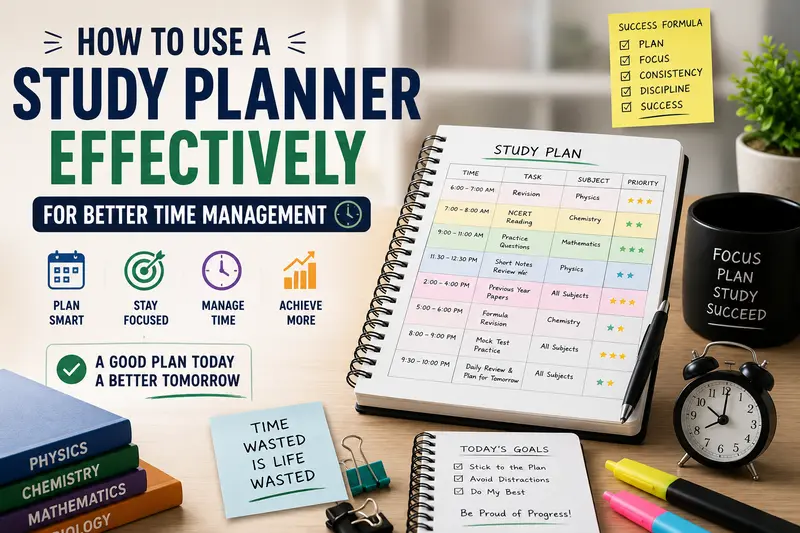
Notion, Microsoft OneNote, and most digital calendar tools handle this well, covering everything from planning study sessions to tracking assignments and organizing revision. For more on the technique itself, see How to Use a Study Planner Effectively for Better Time Management.
Authoritative Resources
For more on digital learning and online safety, these are worth exploring:
- UNESCO – Education and Digital Learning
- Common Sense Education – Digital Citizenship & Learning Resources
Both offer evidence-based guidance for students, parents, and educators on using educational technology responsibly.
Conclusion
Educational apps have genuinely become powerful learning companions in 2026 — personalized lessons, interactive quizzes, real progress tracking, and access to good material whenever you need it. Whether the goal is cracking CBSE boards, strengthening a weak subject, or just building better habits, the right combination of apps can make studying feel less like a grind.
But no app replaces consistency, discipline, and actually sitting down to think through a problem. The students who do well are the ones using technology to support their classroom learning, NCERT textbooks, and written practice — not to replace them. Pick reliable apps, follow a study plan that fits your life, and check in on your progress regularly, and the confidence follows.
Parents and teachers matter here too — encouraging balanced screen time, keeping an eye on progress, and helping students choose wisely goes a long way. Used thoughtfully, study apps can build independence, sharpen time management, and set students up for more than just exam season.

The CBSE Guide Editorial Team creates helpful educational content for students, parents, and learners across various academic and personal development topics.